TL;DR
Best for: Creators, researchers, and AI power users who want a visual AI workspace to organize ideas and run AI tasks across a project.
Not ideal for: People who prefer simple chat tools or want predictable flat-rate pricing.
Starting price: Free plan available. Paid plans start around $15/month when billed annually (pricing checked March 2026).
Our take in one sentence: Flowith replaces the traditional AI chat window with a visual canvas that makes complex projects easier to organize — but its credit-based pricing means you need to pay attention to usage.
What Flowith Is
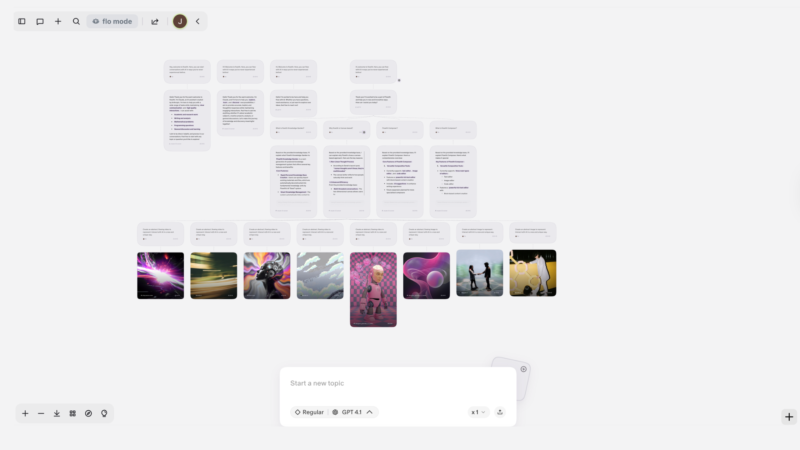
Flowith is an AI workspace built around a visual canvas instead of a single chat thread.
Rather than running prompts one after another in a conversation window, you can create branches of ideas, research notes, prompts, and AI outputs across a board. Think of it as a mix between:
- a mind-mapping tool
- a project workspace
- and an AI assistant that can generate content and research within the same environment.
The platform positions features like Agent Neo and FlowithOS as the automation layer that can handle multi-step tasks across the canvas.
In practice, the goal is simple: help users work with AI across complex projects without losing context.
How the Canvas Workflow Works
The biggest difference with Flowith is the visual project layout.
Instead of scrolling through a long chat history, you can:
- Create multiple prompt nodes
- Branch ideas into separate threads
- Organize outputs into groups
- Keep research and generated content connected
For projects where ideas evolve and split into different directions — content strategy, research projects, product planning — this layout can make it easier to see how everything fits together.
For quick one-off prompts, however, a traditional chat interface will usually be faster.
Real-World Example
A good example is a content strategist planning a launch campaign.
Inside Flowith, they could create a canvas with branches for:
- market research
- messaging angles
- blog outlines
- social media ideas
- visual assets
Each branch can generate AI outputs while remaining connected to the overall project.
Instead of juggling multiple chat tabs and documents, the entire workflow lives on one board.
For visual thinkers or complex projects, this can reduce a lot of friction.
Key Features
Visual AI Canvas
The core interface lets you organize prompts, outputs, and notes visually across a project board.
Agent-Style Task Execution
Flowith promotes an agent-driven workflow where AI can handle multi-step tasks and research workflows rather than single prompts.
Knowledge Organization
Projects can be grouped and structured into larger knowledge collections (sometimes described as a “Knowledge Garden” in Flowith’s product messaging).
Multimodal Generation
Depending on the models available in your plan, the platform supports text generation, research synthesis, and visual outputs within the same workspace.
Pricing
Flowith uses a credit-based pricing system, which is important to understand before committing.
As of March 2026, plans include:
Free Plan
- No monthly fee
- Includes starter credits to test the platform
Professional
- About $15/month billed annually
- Monthly credit allocation and expanded workspace features
Ultimate
- About $30/month billed annually
- Higher credit limits and additional capabilities
Infinite Creator
- Around $250/month
- Designed for heavy AI usage
Enterprise
- Custom pricing
Because the platform runs on credits, your real cost depends on how heavily you use AI models. High-volume tasks or advanced models can consume credits quickly.
How Flowith Compares to Chat-Based AI Tools
Compared to tools like ChatGPT or Claude, Flowith focuses less on conversation and more on project structure.
That makes it better suited for:
- research workflows
- content production pipelines
- idea mapping
- complex planning tasks
But for quick prompts or everyday questions, chat tools are usually simpler and more predictable.
Who Should Use Flowith
Flowith is a good fit for:
- Content creators managing multi-step projects
- Researchers exploring complex topics
- AI power users who like visual organization
- Teams that want brainstorming and generation in one workspace
Who Should Skip It
Flowith may not be the right fit for:
- Users who mainly ask quick AI questions
- Teams that want predictable flat-rate pricing
- People who prefer a simple chat interface
Final Verdict
Flowith is part of a growing category of AI workspaces designed for projects, not just conversations.
If your work regularly involves research, brainstorming, and content creation across multiple ideas, the canvas approach can be genuinely useful.
Just keep in mind that credit-based pricing means efficiency matters — especially if you rely heavily on AI models.
Try Flowith
Disclosure: Friendly AI Tools may earn a commission if you sign up through our affiliate link. If you do, we sincerely appreciate the support for our work.