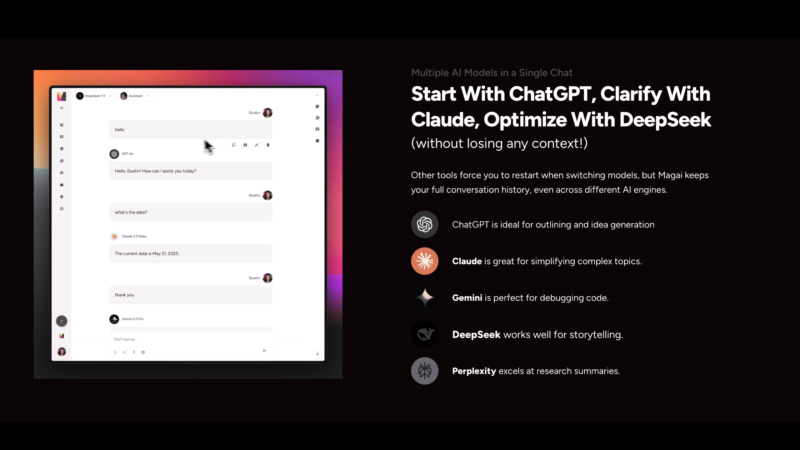
If you use AI regularly, you’ve probably run into this problem: no single model is best at everything.
ChatGPT might be great for structured writing. Claude often excels at thoughtful long-form responses. Gemini can be strong for research and multimodal tasks. But subscribing to each one separately gets expensive fast.
Magai was built to solve exactly that problem. It brings 50+ AI models from major providers into a single interface, so you can switch between them without juggling multiple subscriptions, browser tabs, or conversation histories.
We spent time using Magai across writing, research, image generation, and everyday workflows to see whether the “all-in-one AI platform” approach actually works in practice.
What Is Magai?
Magai is an AI platform that provides access to models from:
- OpenAI (GPT-4, GPT-5)
- Anthropic (Claude)
- Google (Gemini)
- Meta (Llama)
- xAI (Grok)
- DeepSeek
- Mistral
- Perplexity
…and dozens more.
All of these models live inside one chat interface, so you can move between them without starting over.
The platform was founded in 2023 by entrepreneur Dustin Stout and has grown quickly, now serving 50,000+ users who want centralized access to premium AI tools.
Magai goes beyond text chat. The platform also includes:
- Image generation (DALL-E, Flux, Ideogram, Leonardo)
- Video generation (Runway, Kling)
- Web search
- Document analysis
- Speech-to-text tools
In other words, Magai functions less like a single chatbot and more like a control panel for modern AI tools.
The Multi-Model Advantage
The biggest benefit of Magai is simple: model flexibility.
In a single conversation, you can:
- Start with one model
- Decide it’s not producing the result you want
- Switch to another model without losing your conversation history
Most AI platforms force you to restart the conversation when switching models. Magai preserves the full context, which makes experimentation much easier.
There’s also an Auto mode that automatically selects a model based on your prompt. In practice, it works reasonably well for general tasks, though experienced users will probably still want to select models manually for specialized work.
The real value is convenience. Instead of managing separate subscriptions for multiple AI platforms, you can access a wide range of models through one interface and one subscription.
Custom Personas and Workspaces
One feature that stood out during testing is Magai’s persona system.
You can create saved instruction sets that define how the AI behaves for specific tasks. For example:
- Marketing strategist
- Technical writer
- Code reviewer
- Social media editor
Once saved, you can switch between personas instantly instead of rewriting system prompts every time you start a new conversation.
Magai also includes workspaces, which let you organize conversations by project or client.
For freelancers, agencies, or anyone juggling multiple projects, this makes the platform much easier to manage. Instead of digging through a single long chat history, everything stays organized by topic.
Image and Video Generation
Magai also includes access to several image generation models, including:
- DALL-E 3
- Flux
- Ideogram
- Leonardo
- Nano Banana and more
Because these tools live in the same interface as the chat models, you can move from writing content to generating images without switching platforms.
One particularly useful feature is the ability to compare results across different image models. This makes it easier to find the model that works best for a specific type of project.
Magai also includes:
- Prompt enhancement tools
- Seed controls for visual consistency across multiple images
These features are especially helpful if you’re generating a series of related images.
Video generation tools such as Runway and Kling are also integrated, giving users access to emerging AI video capabilities without leaving the platform.
Team Collaboration
Magai’s Professional plan includes collaboration tools for small teams.
Teams can share:
- Workspaces
- Conversations
- Prompt libraries
This makes it easier to standardize workflows and maintain a consistent brand voice across multiple users.
Instead of every team member experimenting separately, teams can build on each other’s prompts and results.
For agencies or small marketing teams experimenting with AI, this collaborative layer adds meaningful value.
Good to know
No platform is perfect, and Magai has a few limitations worth noting.
Usage limits
Magai uses a word-based usage system tied to each plan.
For most users, this probably won’t be a problem, but heavy AI users may eventually run into limits depending on how much they generate each month. This isn’t a dealbreaker, though, and not unique to Magai. Most AI tools limit usage based on the plan, including Claude, ChatGPT, and Gemini. Tokens have cost, and companies need to balance usage across users and can justifiably charge more for the heaviest users. If you hit your monthly usage limit on your plan, you can easily add more credits to get the job done.
In our experience, the limits are reasonable, and most users won’t hit them, but power users may need to upgrade plans or buy extra credits for the billing cycle.
Learning curve
Because Magai includes so many models, features, and settings, the interface can feel a bit overwhelming at first if you’re new to multi-model platforms.
New users may need a few sessions to develop a comfortable workflow.
That said, once you understand the structure — models, personas, and workspaces — it becomes much easier to navigate.
Dependent on underlying models
Magai is an aggregator. If one of the underlying models experiences downtime or slow performance, you’ll still feel that inside the platform.
The upside is that you can often switch to another model immediately, which reduces the impact compared with relying on a single provider.
Pricing
Magai offers three primary plans:
Solo — $20/month
- 1 user
- Unlimited workspaces
- Access to all AI models
- Standard usage limits
Team — $40/month
- Up to 5 users
- Unlimited workspaces
- Higher usage limits
- Shared prompt libraries
- Team collaboration tools
- Additional users can be added for $20 per month, with volume discounts available.
If you hit your tier’s usage limits, you can add tokens without waiting for the next billing cycle. When compared with subscribing individually to multiple AI platforms, the pricing is seriously competitive.
Who Magai Is Best For
Magai is particularly useful for people who regularly use multiple AI models.
It’s a strong fit for:
- Content creators
- Marketers
- Freelancers
- Startup founders
- Small teams experimenting with AI workflows
If you frequently switch between models for different tasks, having them all available in one place can save both time and money.
However, casual users who only need AI occasionally may be better served by free tiers from individual providers.
Final Thoughts
Magai doesn’t try to replace the major AI models. Instead, it focuses on making them easier to access and manage in one place.
In practice, that approach works surprisingly well.
The ability to switch models mid-conversation, organize projects with workspaces, and generate text, images, and video from one interface makes Magai feel more like an AI productivity hub than a typical chatbot.
For anyone who already uses multiple AI tools, Magai is one of the simplest ways to consolidate those workflows and potentially save hundreds per year.
As consumers and small businesses seek to tighten their budgets amid this uncertain economy, we strongly recommend Magai to adopt a full-stack AI environment that helps you save significant money.
Disclosure: Friendly AI Tools may earn a commission if you sign up through our affiliate link. This helps support our work reviewing and researching AI tools. We only recommend products we believe provide real value. If you choose to sign up through our link, we sincerely appreciate the support.